

Use cases
A daily Search Console report built by a bot
Every morning at 9 a report appears in our team chat: a one-line verdict, three key numbers, a 30-day trend, which sites grew or dropped, and which pages get impressions but no clicks. This is the same report rendered by the bot with demo data:
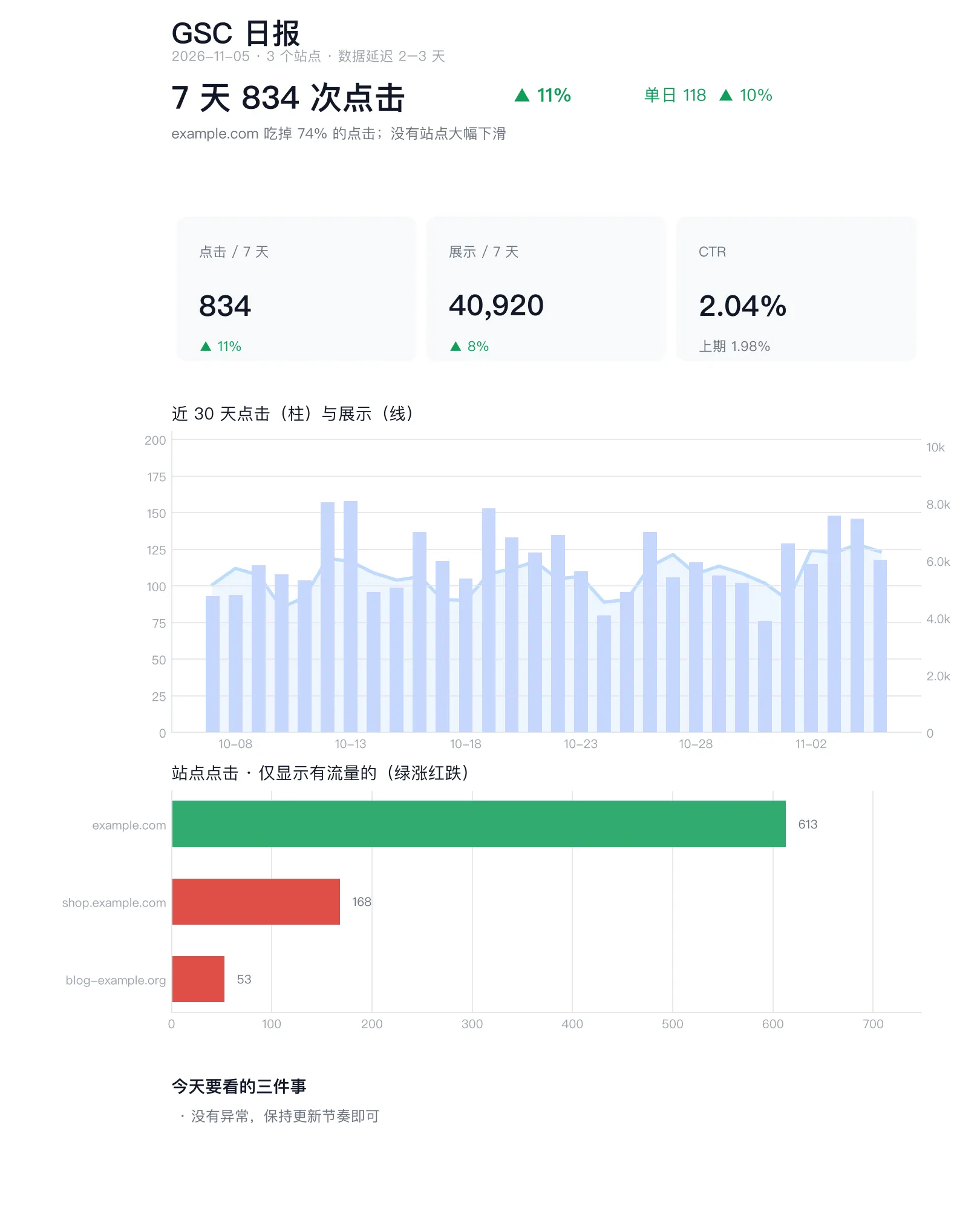
We use this bot every day. It covers all the Search Console properties across several Google accounts. From the first request to a fixed layout and a daily schedule took under 3 hours of conversation, and the first on-time report arrived the next morning. Your hands-on part is a few settings in Google Cloud, one consent per account and a bot in the Feishu group; the bot sends you the link and what to fill in for each step.
How it works
Section titled “How it works”

An OpenMausBot routine wakes the bot at 0 9 * * * (Asia/Shanghai time zone) and it runs the script it wrote. The script does the heavy lifting. The model only orchestrates, handles errors and explains them. A real run: 19 steps, under 3 minutes, about 488 k input tokens, 94% of them cache hits. If a delivery fails, the bot leaves the reason in its chat instead of silently skipping a day.
You need
Section titled “You need”- An always-on OpenMausBot (routines don’t run while a Mac sleeps).
- A bot on a cheap, fast model (we use DeepSeek V4.1 Flash on OpenCode Go).
- Your Google account(s) and a group chat that accepts webhooks (we use Feishu; Slack and WeCom group bots work the same way).
What to tell the bot
Section titled “What to tell the bot”No code from you. Create a bot (call it “SEO”) and send it:
I have several Google accounts, each with sites in Search Console. Combine the data for all of them:
1. Authorize these accounts with OAuth (one consent each). New sites should join the report automatically.2. Store data in a local database, sync incrementally every day, keep the history.3. Every day at 9:00 my time, post a report to my group chat: a one-line verdict at the top, then   7-day clicks, impressions, CTR with change, a 30-day trend, sites with traffic ranked by clicks,   sites with impressions but no clicks listed separately, details collapsed.4. Send it through the group's incoming webhook. Ask me for the webhook URL with a secret card,   never in chat.5. If it fails, tell me why in this conversation. Never skip silently.
Show me the report on demo data first; connect real data after I approve the format.
Only you can do this
Section titled “Only you can do this”-
Create a Google Cloud project and enable the Search Console API. Create a project, open the Search Console API page and click Enable.
-
Set up the OAuth client. In Google Auth Platform:
- Branding: app name, support email, audience External. To publish, the same page also needs an app home page, a privacy policy link and an authorized domain, or the publish button stays gray.
- Data access: add only the
https://www.googleapis.com/auth/webmasters.readonlyscope. More scopes trigger Google’s sensitive-scope review. - Clients: type Desktop app. Download the JSON and send it to the bot.
-
Publish the app to production. Under Audience, click Publish app. Otherwise refresh tokens expire after 7 days. If sign-in shows an “unverified app” warning, choose Advanced → Continue for personal use.
-
Consent once per Google account. The bot sends a sign-in link. Sign in with that account and approve. The browser lands on a
localhostpage that doesn’t load; copy the whole address from the address bar back to the bot. Repeat per account. -
Add a custom bot to the group. In Feishu: ··· at the top right of the group → Settings → Bots → Add bot → Custom bot, name it, choose custom keyword security with
GSC(always in the report title), and copy the webhook URL. -
Paste the webhook into the bot’s secret card, not the chat. Secret cards hand the value to the bot’s process without it ever appearing in the transcript.
The decisions that made it work
Section titled “The decisions that made it work”| Decision | Our choice | Why |
|---|---|---|
| Reading several Google accounts | OAuth per account | The bot first proposed a service account, which has to be added to every property by hand. With OAuth, each account consents once and new sites appear automatically |
| Will the token expire in 7 days? | Publish the OAuth app to production in Google Cloud | Refresh tokens of apps in testing expire after 7 days and the report silently stops |
| Which chat bot type | Webhook (custom bot) | A Feishu group with external members is an external group. App bots without the external-sharing capability can’t join it; custom bots can |
| Layout | Verdict → three numbers → trend → collapsed details | The report’s job is to tell you in five seconds whether today needs attention |
| Dates | Treat data as 2 days late | Search Console lags; counting “today” always undercounts |
Have the bot save what it learned
Section titled “Have the bot save what it learned”While building it, the bot wrote the whole procedure and its pitfalls into its memory. The next time you ask it for a daily push to some group, it follows that record. To let other bots use the same approach, say “save how we did this as a skill”.
Make it yours
Section titled “Make it yours”- Another chat app: Slack and WeCom group bots also take webhooks, so only the sending step changes. Telegram has no group webhook; send through a bot token instead.
- One site at a time: add a site filter and send a separate report for each site.
Next steps
Section titled “Next steps”- Track the hottest posts on X: the top posts on a topic every week, with links, and silence when nothing changed.
Spotted a mistake or something out of date? Tell us on GitHub
MausBot Guide is an independent, unofficial community guide and is not affiliated with Supamaus Software Private Limited. OpenMausBot, MausBot and the mascot are trademarks of their respective owner.