

How-to guides
How to sign in to Claude, Codex and OpenCode on a server
An engine is the agent CLI a bot runs on: claude, codex, opencode, and so on. On a server, each engine needs
its own sign-in on the server, because that’s where the processes run. You can install a CLI from
Settings → AI (it goes into ~/.openmausbot/tools) or with npm yourself. Either way, sign it in on the server.
Before you start
Section titled “Before you start”- An OpenMausBot server you can reach with
ssh myserverfrom this computer (see how to run OpenMausBot 24/7 on a home server). - The subscription or API key for each engine you want.
Below, myserver is the server’s SSH alias and anything in <…> is a value you replace.
Decisions: which engine first
Section titled “Decisions: which engine first”Ranked by how well sign-in works on a machine without a screen:
| Engine | How it signs in | Headless | You need |
|---|---|---|---|
| OpenCode | API key (copy it from the opencode.ai console, paste it with opencode auth login on the server) |
★★★ | OpenCode Go/Zen, or nothing (free models) |
| Codex | Device code (enter a code on a web page) | ★★★ | ChatGPT subscription |
| Kimi | Device code | ★★★ | Kimi Code membership |
| DeepSeek Harness | API key | ★★★ | DeepSeek API key (pay as you go) |
| Claude Code | Open the sign-in page, paste back the code it shows | ★★ | A paid Claude plan such as Pro or Max |
| Antigravity (Gemini) | Sign in to Google in a browser, paste back the address of the page it redirects to | ★ | A Google account |
Get one easy engine working first (OpenCode or Codex), prove the whole chain with a real message, then add the fussy ones.
OpenCode also has free anonymous models. They are good for testing the pipeline, not for real work.


Hand this to your agent
Section titled “Hand this to your agent”On my OpenMausBot server (ssh alias "myserver"), get engines signed in. I want: <engines, e.g. OpenCode Go and Codex>.
- OpenCode needs an API key: let me `ssh myserver` and run `opencode auth login` myself, choose OpenCode Go and paste the key. Don't handle the key.- For device-code engines, start the sign-in on the server and give me only the URL and code to enter.- After each engine: run `openmausbot models` on the server and confirm its models are listed. Then run `openmausbot run "MausBot" "Reply with exactly: OK"` on a model from that engine.- Set the default model for new bots to <model> if I named one.
Never echo API keys, tokens, or auth files. If a sign-in needs a browser step, stop and tell me exactly what to click.Only you can do this
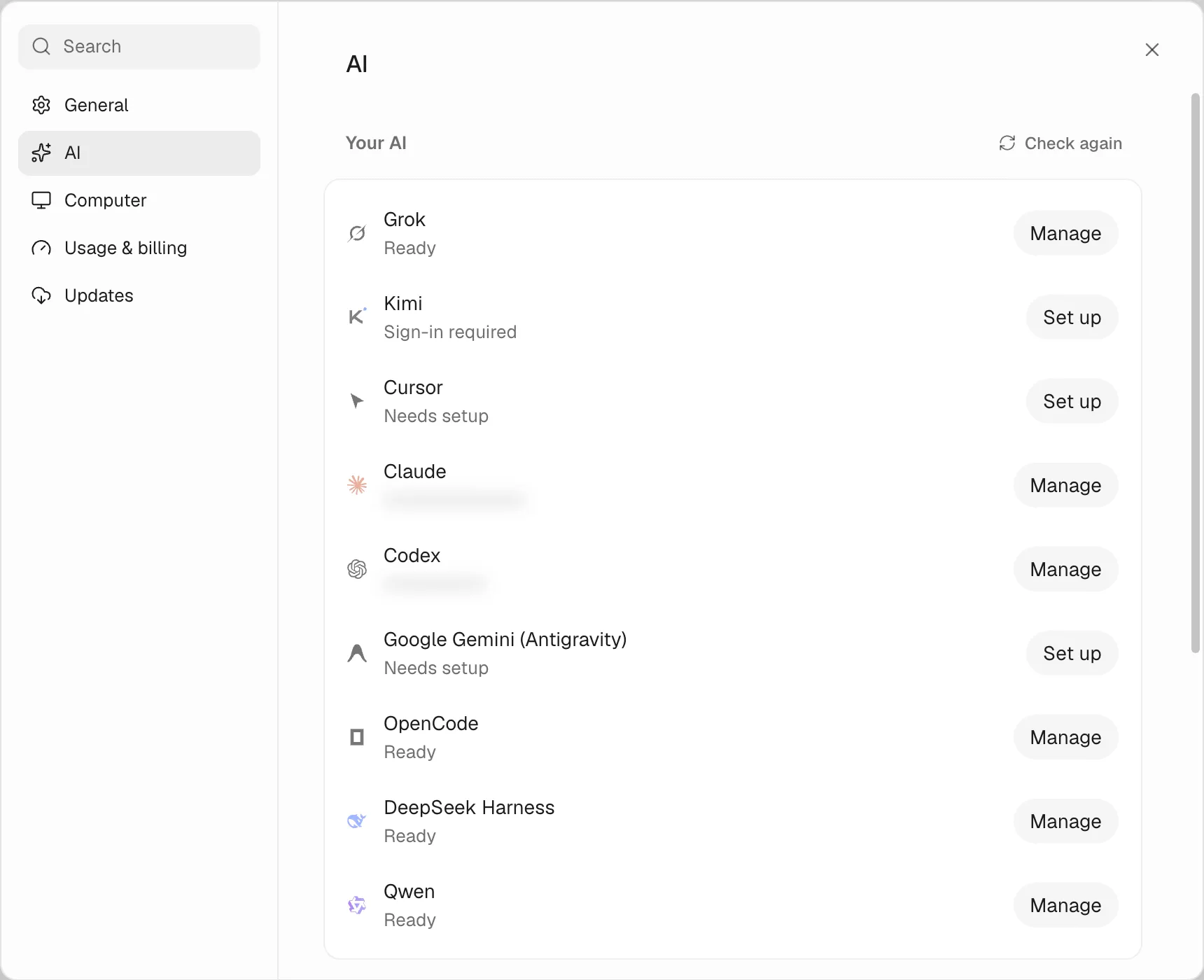
Section titled “Only you can do this”- Approve each sign-in in your browser: enter the device code (Codex, Kimi), or open the sign-in page and paste back the code it shows (Claude). Use the account that has the subscription. You can also do these from Settings → AI: click Set up on the engine and finish in your browser, no terminal needed.
- Paste API keys into Settings → AI → API keys yourself, not into a chat with your agent. OpenMausBot stores them write-only and passes them only to the engine process.
Check it worked
Section titled “Check it worked”Open Settings → AI. Each signed-in engine is listed under Your AI with its account email or Ready. Then open the model selector at the top of any chat and check that its models are listed.
Where it goes wrong
Section titled “Where it goes wrong”- Two providers, almost the same model names. In OpenCode,
Go · DeepSeek V4.1 Flash 1017is your Go subscription.Zen · DeepSeek V4.1 Flash 1017bills your Zen balance by usage. Pick by the prefix, not the name. - Claude sign-in fails. In Settings → AI, click Set up on Claude again, open the complete sign-in page, check the browser is signed into the Claude account you mean, and paste back the whole code it shows.
- Antigravity doesn’t reuse your existing agy login. OpenMausBot installs its own Antigravity runtime, separate from
the Antigravity app and the
agyCLI. Install it from Settings → AI and sign in with Google there. Each setup has its own Google account.
Spotted a mistake or something out of date? Tell us on GitHub
MausBot Guide is an independent, unofficial community guide and is not affiliated with Supamaus Software Private Limited. OpenMausBot, MausBot and the mascot are trademarks of their respective owner.